7.25.2026 - A brief discussion of SSL Certificates and Public Key Cryptography
Cryptography is really quite amazing, and this article barely scratches the surface.
Beyond the technical details it has a rich history.
 The Code Book: The Science of Secrecy from Ancient Egypt to Quantum Cryptography
by Simon Singh, is one of my favourite books on the subject. My plan for future posts is to explore
the fundamental standard cryptography practices, such that they become tools everyone can employ
on the fly, instead of only when a 3rd party service or business offers them. But until then, Let’s
carve out a few core fundamental concepts.
What is a Certificate Authority?


A certificate authority (CA) is a trusted (third party) entity/organization which issues, identifies, and verifies certificates. As a trusted third party, they vouch for other online services, so that users of those services, can assume trust by association.


In short form logic: If A trusts B, and C trusts A, then logically C should be able to trust B.


Internet web browsers are probably the most common consumer/users of certificates. Browsers verify that a website you are visiting, is trusted by the third party certificate authority. The verification process
ensures the visited domains are factually the domains you think they are, and not an interloper masquerading as your financial institution or other personally private online services. Before discussing SSL Certificates, lets first discuss basic concepts around Public Key Cryptography.
A Public Key Cryptography Primer:


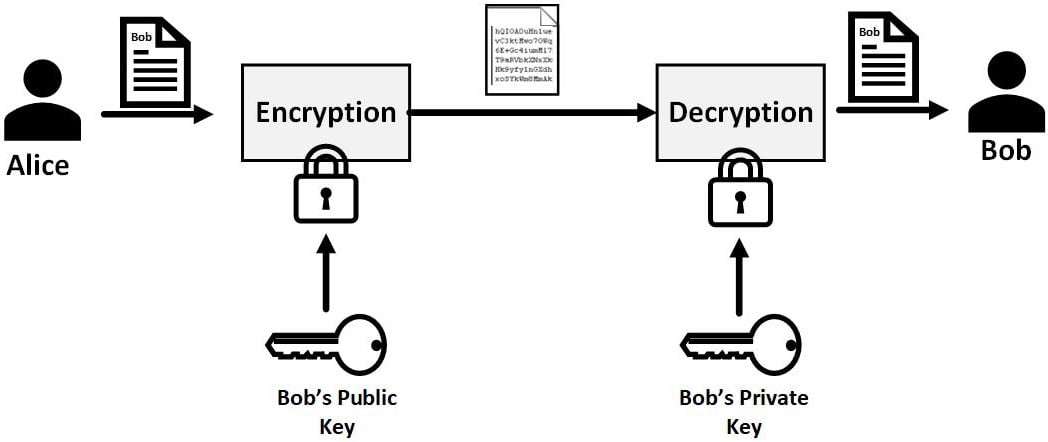
Public Key Cryptography involves 2 important artifacts, a public key and a private key.
These two keys are mathematically associated (paired) with each other.  Public keys are
used to encrypt information, and the private key is used to decrypt it. As an example,
Alice and Bob want to communicate in private. They each exchange their public keys with
one another. Alice will use Bob's public key to encrypt a message and send it to him. Bob
can then decrypt it with his private key to read the contents. Bob will use Alice's public
key to encode his reply, and Alice can decrypt with her Private key.
Cryptographic signatures


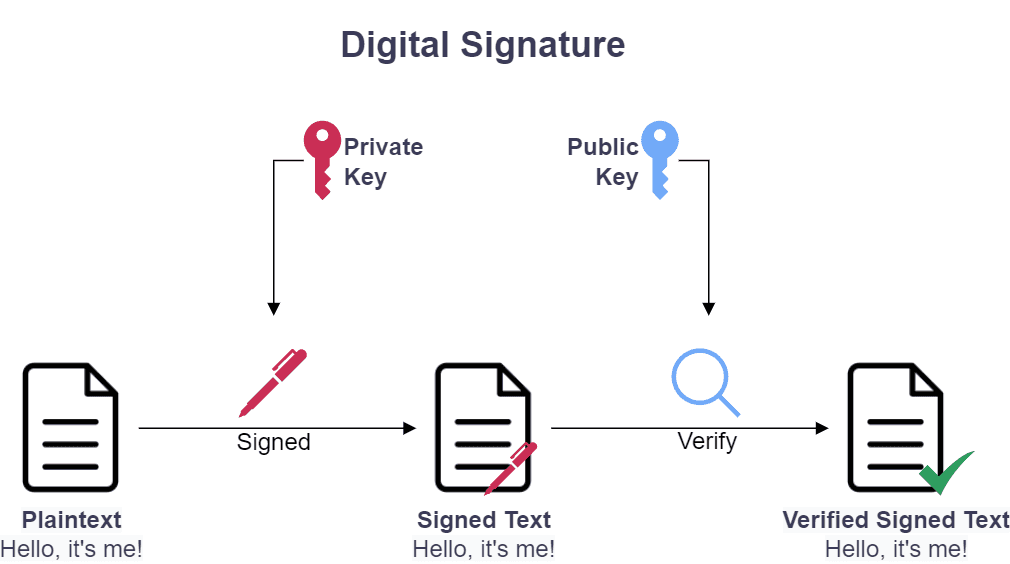
Cryptographic signatures are a way of proving that a message was signed by a particular private key.
Given readable clear text, a private key is used to generate the cryptographic signature of that text.
Cryptographic signatures help to ensure that online domains or message senders are who they say they are.
How Certificates are created:


1. The Certificate Authority generates a private key. This key will never (should never) be exposed publicly. Let's call this the CA.key


2. From the CA's private key, an X.509 certificate is generated. An X.509 certificate is essentially an public key combined with a digital signature as a form of identity. Let’s call this certificate this the CA.cert.


3. Using the Seattle Public Library (spl.org) website as an example, spl.org wants to prove its identity to users. spl.org generates their own private key; similar to what the CA did in Step 1. We will call this the server.key.


4. spl.org needs to create a trusted certificate to present to users for verification. This certificate will identify spl.org and show that spl.org is also trusted by the certificate authority. To do this, spl.org creates a Certificate Signing Request (CSR). This is generated by using their FQDN  (e.g: spl.org) + spl.org's server.key. The CSR is sent to the CA.


5. Once the Certificate Authority has the CSR, it verifies requirements of identity. If the CA agrees to confirm identity,  the CA will generate a signed certificate using the CSR, the CA.key and the CA.cert. The Certificate is sent to spl.org, who installs/binds it to the spl.org website.


Most free software based operating systems already possess root certificates from well known certificate authorities such as Verisign, and Let’s Encrypt. These are often provided by p11-kit library.
Web browsers connecting to spl.org will be presented with spl.org's certificate. The browser reads the certificate to identify the CA, which can then verify against the CA’s public certificate (also referred to as a root certificate) from Step 2.
Self Signed Certificates


A self signed certificate is a certficate signed by a CA which is you. In situation where you do not need or
want to purchase an actuall certificate, you can generate your own. Below is a small script which demonstrates
the steps discussed above to create a self-signed certificate using openssl.
SERVER_CN="$1"


echo "$SERVER_CN"


# The Certificate Authority Credentials


# CA Creates the CA key


openssl genrsa -passout pass:1111 -des3 -out ca.key 4096


# CA Generates x.509 Certificate from CA Key


openssl req -passin pass:1111 -new -x509 -days 365 -key ca.key -out ca.crt -subj "/CN=${SERVER_CN}"


# spl.org Creates Private Key


openssl genrsa -passout pass:1111 -des3 -out server.key 4096


# spl.org creates Certificate Signing Request (CSR)
openssl req -passin pass:1111 -new -key server.key -out server.csr -subj "/CN=${SERVER_CN}"


# CA Signs the CSR. Returns to server.crt back to spl.org.


openssl x509 -req -passin pass:1111 -days 365 -in server.csr -CA ca.crt -CAkey ca.key -set_serial 01 -out server.crt


# spl.org generates non-encrypted (PEM formatted) private key.


# This private key is used by spl.org's webserver to decrypt messages encrypted by the server.crt


openssl pkcs8 -topk8 -nocrypt -passin pass:1111 -in server.key -out server.pem
|
The contents of our
communications and personal information are hot commodities to be bought and sold,
for profit, exploitation and manipulation of society. The effort to keep privacy
private, is everyone's responsibility. I'll end this post with a quote by Mr. Snowden...


Under observation, we act less free, which means we effectively are less free.


- Edward Snowden
|
|